
“Electronic health records (EHRs) help dermatology practices manage patient information, document consultations, and coordinate treatments. However, maintaining accurate records while seeing a high volume of patients can create significant administrative pressure. A virtual assistant for medical spa services and specialized medical support teams can help reduce this burden by managing routine EHR tasks, organizing records, and coordinating patient communication under established practice protocols.
For dermatology clinics, improving EHR efficiency is not simply about saving time. It is about helping providers focus on patient care while maintaining accurate documentation, protecting sensitive information, and supporting sustainable practice growth.” - Rhane Handisides
“Electronic health records (EHRs) help dermatology practices manage patient information, document consultations, and coordinate treatments. However, maintaining accurate records while seeing a high volume of patients can create significant administrative pressure. A virtual assistant for medical spa services and specialized medical support teams can help reduce this burden by managing routine EHR tasks, organizing records, and coordinating patient communication under established practice protocols.
For dermatology clinics, improving EHR efficiency is not simply about saving time. It is about helping providers focus on patient care while maintaining accurate documentation, protecting sensitive information, and supporting sustainable practice growth.” - Rhane Handisides
Understanding Customer Medical Support for Dermatology Practices
Customer medical support combines healthcare-focused administrative assistance with patient service coordination. In dermatology, this support can help bridge the gap between clinical teams, front-desk personnel, and the EHR system, ensuring that routine operational tasks are completed according to established procedures.
What Is Customer Medical Support in a Dermatology Setting?
Customer medical support refers to assistance with patient-facing administrative tasks and healthcare workflow coordination. It may be delivered by in-house personnel, remote medical administrative professionals, or specialized virtual support teams.
In a dermatology setting, responsibilities can include appointment coordination, patient information updates, chart preparation, medical record requests, and routing messages to clinical staff.
For example, when a patient requests a copy of their dermatology records, support staff can verify the request according to practice procedures, coordinate the necessary authorization, and route the request to the designated records team.
How Medical Customer Support Differs From General Administrative Assistance
General administrative assistants may handle calendars, emails, and routine office tasks. Medical support professionals, by contrast, should receive training relevant to healthcare terminology, patient privacy, medical scheduling, and the practice's EHR workflows.
This distinction matters because dermatology records may contain sensitive clinical information, biopsy documentation, medication details, and procedure histories.
Specialized support personnel should understand when to complete an administrative task, when to request clarification, and when to escalate a concern to a licensed clinician. They should not independently interpret clinical findings, diagnose conditions, or make treatment decisions outside their qualifications and authorized role.
Which EHR-Related Tasks Can Medical Support Staff Handle?
With appropriate training and authorization, medical support staff can assist with several routine EHR activities, including:
- Updating patient demographics and contact information.
- Preparing charts for scheduled consultations.
- Entering approved administrative information.
- Organizing incoming records and referral documentation.
- Routing portal messages to the appropriate team.
- Coordinating appointments and follow-up reminders.
- Tracking administrative tasks associated with medical record requests.
- Flagging incomplete fields or missing documentation for review.
Clinical documentation, order entry, and transcription require additional safeguards. Depending on the task, support personnel may prepare draft information, enter clinician-directed orders, or assist with approved documentation workflows. Authorized clinicians must review and authenticate clinical content as required by law, organizational policy, and the EHR system.
When Should a Dermatology Practice Consider Dedicated Medical Support?
Dedicated medical support may be worth considering when providers regularly complete charts after clinic hours, staff members struggle to keep up with portal messages, or administrative backlogs interfere with patient coordination.
It can also help practices preparing to expand services, increase appointment availability, or standardize workflows across multiple locations.
Before hiring, practice managers should identify recurring bottlenecks, determine which tasks can be delegated safely, and estimate whether the expected time savings justify the cost. A clearly defined scope of work makes it easier to measure results and avoid unnecessary duplication between in-house and remote teams.
Common EHR Efficiency Challenges in Dermatology
Even when a practice has invested in modern EHR software, inefficient processes can create unnecessary work. Identifying these obstacles is the first step toward improving documentation quality and operational performance.
Managing High Volumes of Patient Records and Clinical Documentation
Busy dermatology clinics may manage new consultations, chronic skin conditions, cosmetic procedures, biopsies, and follow-up visits throughout the day. Each encounter generates information that must be recorded, organized, and made accessible to authorized team members.
Support staff can help prepare charts, organize incoming documents, and flag missing administrative information before appointments. This reduces avoidable preparation work without transferring clinical responsibility away from providers.
Reducing Duplicate Data Entry and Repetitive Administrative Tasks
Repeatedly entering patient details, appointment information, or insurance data consumes time and increases the possibility of inconsistencies.
Practices can reduce duplication by standardizing intake procedures, using approved EHR templates, and defining which system serves as the authoritative record. Support staff can follow these procedures and flag conflicting information rather than guessing which entry is correct.
Coordinating Appointments, Referrals, and Follow-Up Visits
Dermatology scheduling often involves consultations, procedures, biopsy reviews, and follow-up assessments. Each may have different timing and preparation requirements.
A designated support team can coordinate referrals, track outstanding scheduling tasks, and arrange follow-up visits according to provider instructions. For biopsy-related workflows, staff can maintain administrative tracking lists and escalate overdue tasks under the clinic's established protocols.
Handling Patient Messages and Documentation Requests
Patient portals provide convenient communication but can create a substantial administrative workload. Messages may concern appointment availability, prescription requests, medical records, billing, or clinical symptoms.
Support personnel can categorize messages, answer approved administrative questions, and route clinical concerns to qualified staff. Requests involving potential complications or urgent symptoms should follow the practice's escalation procedures rather than remain in a routine administrative queue.
Preventing Incomplete Records and Scheduling Errors
Missing demographic details, unsigned documentation, incomplete intake forms, and incorrect appointment assignments can disrupt clinic operations.
Standardized checklists and designated review queues help staff identify administrative gaps. Any corrections involving clinical content should be referred to the responsible clinician or authorized team member, with appropriate audit trails maintained.
Balancing EHR Administration With Direct Patient Care
When clinicians spend too much time navigating screens, documenting encounters, and managing routine administrative tasks, less time remains for direct patient interaction.
Delegating suitable administrative work can help restore that balance. The goal is not to reduce documentation standards but to ensure that each task is handled by the appropriate person at the appropriate stage of the workflow.
How Customer Medical Support Streamlines EHR Workflows
Integrating medical support into existing EHR processes can improve consistency without requiring a complete system replacement. Success depends on clear responsibilities, standardized procedures, and appropriate access controls.
Updating Patient Demographics and Administrative Information
Authorized support staff can update contact details, preferred communication methods, and other administrative fields after following identity-verification and information-validation procedures. Conflicting or uncertain details should be flagged for clarification.
Organizing Patient Records and Supporting Chart Preparation
Before consultations, support professionals can gather available records, organize referral documents, confirm that required forms are present, and flag missing administrative information.
For dermatologists, this preparation can make relevant documentation easier to locate during appointments. Clinical interpretation and confirmation of medical findings remain the responsibility of qualified clinicians.
Managing Appointment Documentation and Follow-Up Tasks
Support staff can record approved scheduling information, maintain follow-up task lists, and send reminders based on documented provider instructions. Standardized workflows help prevent routine tasks from being overlooked.
Routing Patient Messages to the Appropriate Clinical Team
A clear message-triage process ensures that administrative questions reach support staff while clinical questions reach qualified healthcare professionals. Defined response times and escalation rules help prevent important messages from being overlooked.
Coordinating Referrals and Medical Record Requests
Support personnel can track incoming referrals, request missing records through approved channels, and coordinate authorized record releases. Practices should verify patient authorization and follow applicable privacy and disclosure requirements before releasing information.
Identifying Incomplete Administrative Records for Staff Review
Regular checks can identify missing forms, incomplete administrative fields, or unresolved tasks. Support staff should flag these items for the appropriate person rather than modifying clinical records without authorization.
Improving Dermatology Appointment Scheduling Through EHR Support
Scheduling is one of the most practical areas for administrative support because it directly affects patient access, provider time, and daily clinic flow.
Managing New Patient Appointments and Returning Visits
Support teams can coordinate intake forms, verify required administrative details, and schedule returning patients according to clinic guidelines. This helps create a more consistent experience from the first inquiry through subsequent visits.
Coordinating Consultations, Procedures, and Follow-Up Appointments
Different dermatology services require different appointment lengths, equipment, and preparation. Support staff can use approved scheduling rules to allocate suitable appointment slots and confirm any required instructions with the appropriate clinical team.
Reducing Scheduling Conflicts and Double Bookings
Centralized scheduling procedures and accurate EHR updates help staff identify conflicting appointments, unavailable providers, and incorrectly assigned time slots. Standardized booking rules reduce avoidable errors.
Managing Cancellations, Rescheduling Requests, and Waitlists
When patients cancel, support staff can update appointment records, offer available alternatives, and contact waitlisted patients according to clinic policy. This may help practices fill open slots and use available provider time more effectively.
Sending Appointment Confirmations and Patient Reminders
Automated or staff-managed reminders can help patients confirm appointments and receive relevant administrative instructions. Practices should use approved communication channels and avoid including unnecessary sensitive health information in reminders.
Improving Scheduling Visibility Across Providers and Locations
For multi-provider or multi-location dermatology practices, shared scheduling procedures help teams understand appointment availability and coordinate changes. Role-based access and consistent EHR updates ensure that authorized staff work from reliable scheduling information.
Enhancing Patient Intake and Registration Workflows
An efficient patient intake process helps dermatology practices reduce check-in delays, minimize missing information, and prepare for consultations more effectively. With support from trained medical administrative professionals, clinics can organize registration tasks before patients arrive, allowing front-desk staff and clinicians to focus on their respective responsibilities.
Collecting Patient Demographic and Insurance Information
Medical support staff can help collect and update patient names, contact details, insurance information, and other required administrative data. They should follow identity-verification procedures and flag discrepancies rather than make assumptions about conflicting information.
Accurate registration helps reduce avoidable billing delays and makes patient records easier to manage.
Coordinating Digital Intake Forms and Medical History Questionnaires
Digital intake forms allow patients to submit relevant information before their appointments. Support staff can monitor form submissions, identify missing fields, and direct patients to the appropriate resources if they need assistance.
Medical history questionnaires should be routed to the clinical team for review. Administrative staff should not independently interpret symptoms or determine treatment suitability.
Verifying That Required Administrative Forms Are Completed
Incomplete registration forms can delay consultations and create additional work for clinic personnel. A standardized checklist helps support staff identify missing insurance details, demographic information, and other required administrative documents before appointments.
Organizing Consent Documentation for Clinical Review
Dermatology practices may require different consent forms for procedures, treatments, photography, or other services. Support staff can organize submitted documents and flag missing signatures for review.
The appropriate clinician or authorized team member should verify that consent requirements have been met before the relevant procedure or service proceeds.
Preparing Patient Records Before Dermatology Appointments
Pre-visit preparation may include confirming that registration forms are available, organizing previous records, and flagging missing administrative information. This helps providers access relevant documentation without searching through multiple incomplete records during consultations.
Reducing Check-In Delays Through Better Intake Coordination
When intake tasks are completed before arrival, patients may spend less time resolving paperwork at the front desk. Combining digital forms, clear instructions, and dedicated administrative support can create a smoother check-in experience and help clinics maintain their appointment schedules.
Supporting Dermatology Documentation and Clinical Workflows
Dermatology documentation requires consistency because patient encounters may involve clinical observations, treatment plans, medication information, laboratory results, and ongoing assessments. Medical support can help organize these workflows while leaving clinical decisions to qualified professionals.
Preparing Patient Charts Before Scheduled Consultations
Support staff can review charts for missing administrative information, organize incoming records, and confirm that required forms are available. Any incomplete clinical documentation should be flagged for the responsible provider rather than completed through guesswork.
Organizing Previous Visit Notes and Relevant Medical Records
Having previous visit notes and external records readily available can help clinicians understand a patient's treatment history. Authorized support staff can organize documents, identify duplicate files, and route new records to the appropriate section of the EHR.
Supporting Documentation Workflows Under Clinician Direction
Trained personnel may assist with approved transcription, draft documentation, or clinician-directed data entry. Depending on the workflow, providers must review and authenticate clinical content as required by applicable rules and practice policies.
Clear procedures help maintain chart integrity without adding unnecessary documentation work for clinicians.
Routing Prescription Renewal Requests to Authorized Providers
Support staff can receive prescription renewal requests, verify that required administrative information is present, and route requests to an authorized prescriber. They should not independently approve prescriptions, change dosages, or provide medication advice beyond their qualifications.
Coordinating Laboratory Results and External Records for Clinical Review
Incoming laboratory reports, pathology documents, and external medical records must reach the appropriate clinical team. Support personnel can organize these materials and track administrative receipt, but they should follow established escalation procedures for outstanding results and avoid interpreting clinical findings.
Maintaining Clear Boundaries Between Administrative Support and Clinical Decision-Making
Effective delegation depends on knowing which tasks require clinical judgment. Administrative support can organize information, document approved actions, and route requests, while diagnosis, treatment decisions, and clinical interpretation remain with appropriately qualified healthcare professionals.
Optimizing EHR Workflows for Dermatology-Specific Services
Dermatology practices manage a wide range of conditions and procedures, each with distinct documentation requirements. Tailoring EHR workflows to these services helps teams organize records consistently and ensure important follow-up tasks reach the appropriate clinical staff.
Coordinating Documentation for Acne, Eczema, and Psoriasis Visits
Support staff can organize previous visit notes, confirm that relevant forms are available, and flag missing administrative information. Standardized templates can help clinicians document treatment progress consistently while reducing repetitive administrative work.
Organizing Records for Skin Cancer Screening and Follow-Up
Skin cancer screening may involve examination notes, lesion documentation, biopsy referrals, and follow-up appointments. Administrative support can help organize records and track scheduled follow-ups, with clinical findings and care decisions remaining under provider supervision.
Supporting Biopsy Scheduling and Pathology Result Follow-Ups
Biopsy workflows require reliable coordination between appointments, laboratory processing, pathology reports, and patient communication. Support staff can maintain task lists, check whether reports have arrived, and escalate overdue items according to practice protocols. Clinical staff must review results and determine appropriate next steps.
Managing Documentation Workflows for Cosmetic Dermatology Services
Cosmetic dermatology may involve consultations, treatment plans, consent forms, and post-procedure instructions. Support personnel can organize approved documentation and coordinate appointments while ensuring clinical questions are directed to qualified providers.
Coordinating Before-and-After Photography Records According to Practice Policies
Clinical photographs can support treatment documentation and progress comparisons. Authorized staff can help organize images according to the practice's procedures, verify appropriate patient authorization, and ensure photographs are stored in approved systems with suitable access restrictions.
Supporting Long-Term Patient Follow-Up and Treatment Scheduling
Some dermatology conditions require ongoing monitoring or multiple treatment sessions. Support staff can coordinate reminders and future appointments based on provider instructions, helping practices maintain continuity without independently making clinical recommendations.
Improving Patient Communication Through EHR-Connected Support
Patient communication often spans telephone calls, email, and secure portal messages. Connecting these channels to established EHR workflows helps teams maintain organized records and respond more consistently.
Managing Routine Patient Inquiries Across Phone, Email, and Patient Portals
Trained support professionals can handle approved administrative questions about appointment availability, registration forms, clinic procedures, and record requests. A medical spa virtual receptionist can provide similar front-desk support for aesthetic practices, helping route inquiries and maintain accurate scheduling information.
Routing Clinical Questions and Symptoms to Qualified Healthcare Professionals
Questions about worsening symptoms, medication reactions, treatment outcomes, or possible complications require appropriate clinical review. Support staff should follow documented escalation procedures rather than offer diagnoses or treatment advice.
Coordinating Follow-Up Communication After Dermatology Visits
Support teams can send approved reminders, coordinate return appointments, and help distribute clinician-approved instructions through authorized communication channels. These processes help patients understand their next administrative steps.
Helping Patients Navigate Forms, Appointments, and Portal Access
Patients may need assistance completing intake forms, accessing their accounts, or locating appointment information. Clear instructions and consistent support can reduce confusion and improve the overall patient experience.
Documenting Patient Communications According to Practice Protocols
Relevant patient communications should be recorded in the appropriate system according to clinic policy. Staff should document accurately, avoid unnecessary duplication, and route clinical information to the responsible healthcare professional.
Reducing Delays in Responses to Administrative Requests
A shared task queue, clear ownership, and defined response targets can help prevent administrative requests from being overlooked. Practices can monitor unresolved tasks and adjust staffing or workflows when backlogs develop.
Maximizing EHR Efficiency With Dermatology and Medical Aesthetics Practice Software
The right software can bring scheduling, patient documentation, and administrative workflows together. However, software alone does not eliminate operational bottlenecks. Combining suitable technology with trained Clinic Operations Support helps ensure that tasks are completed consistently and exceptions are escalated appropriately.
Improving Patient Scheduling and Administrative Workflows With Zenoti
Zenoti offers software for skin and dermatology clinics, including scheduling, charting, patient communications, and photography workflows.
Practices can evaluate whether its features align with their appointment types, documentation requirements, and existing systems.
Supporting Patient Records and Practice Workflows With Aesthetic Record
Aesthetic Record provides an EMR and practice management platform designed for aesthetic and wellness practices. Its published capabilities include centralized patient information, treatment documentation, photographs, scheduling, and connected workflows.
Clinics should confirm that the platform meets their specific clinical and operational requirements.
Streamlining Patient Engagement and Practice Operations With PatientNow
PatientNow combines practice management with patient records, scheduling, payments, and engagement capabilities for aesthetic practices.
Support staff can help maintain designated workflows within the platform, provided their responsibilities and access permissions are clearly defined.
Evaluating Software Features for Dermatology and Medical Aesthetics Workflows
Before selecting software, practices should assess documentation templates, scheduling flexibility, reporting, patient communication tools, access controls, and integration options. Aesthetic-focused platforms may be useful for cosmetic services, while practices providing complex medical dermatology may need additional clinical functionality.
Coordinating Customer Medical Support With Existing Practice Management Systems
Remote support teams should follow the clinic's established procedures for accessing records, updating administrative information, and tracking unresolved tasks. Clear documentation standards and escalation rules help prevent duplicate work and maintain accountability.
Assessing Integration Capabilities Before Choosing an EHR-Connected Workflow
Confirm whether the software integrates with existing EHRs, billing systems, communication tools, and other essential applications. Verify integration scope, security responsibilities, vendor agreements, and data-transfer limitations before implementation. A well-designed workflow should reduce duplicate entry without compromising patient privacy or record accuracy.
Reducing Administrative Burden Through EHR Task Delegation
Delegating appropriate EHR tasks allows dermatology practices to reduce repetitive work while keeping clinicians focused on patient care. The key is to establish clear responsibilities, documented procedures, and reliable communication between remote support staff and in-house teams.
Identifying Repetitive Tasks That Can Be Delegated Safely
Start by identifying routine activities that consume staff time without requiring clinical judgment. These may include updating patient demographics, preparing charts, organizing incoming records, scheduling follow-up visits, and tracking outstanding administrative requests.
A virtual assistant for medical spa operations may also support appointment confirmations and routine patient inquiries for aesthetic clinics. However, prescription approvals, diagnoses, treatment decisions, and clinical interpretation must remain with appropriately qualified professionals.
Creating Standard Operating Procedures for Routine EHR Activities
Standard operating procedures (SOPs) explain how tasks should be completed, documented, and escalated. For example, an SOP for chart preparation can specify which forms to check, where to organize external records, and how to flag missing information.
Documented procedures help remote and in-house employees follow the same standards, reducing inconsistencies and unnecessary rework.
Establishing Task Ownership and Accountability
Every delegated task should have a designated owner, completion deadline, and escalation contact. A shared task queue can help staff identify outstanding requests and prevent work from being duplicated or overlooked.
Practice managers should also define who reviews completed work and who is responsible for resolving exceptions.
Prioritizing Time-Sensitive Patient Requests and Administrative Work
Not all tasks have the same urgency. Appointment confirmations, routine record requests, and missing registration forms may follow standard deadlines, while time-sensitive clinical messages require prompt routing under the practice's escalation protocol.
Support staff should use predefined priority categories rather than independently assessing medical severity.
Building Reliable Handoffs Between Remote Support Staff and In-House Teams
Effective handoffs ensure that unresolved tasks do not disappear between shifts or teams. Remote staff should document completed actions, pending requests, relevant deadlines, and the person responsible for the next step.
Brief daily updates and a centralized task tracker can improve coordination without creating unnecessary meetings.
Preventing Workflow Bottlenecks Through Clear Escalation Procedures
An escalation procedure explains what happens when information is missing, an EHR system is unavailable, or a request falls outside the support team's authority.
For example, an unreturned pathology report should be routed through the clinic's established tracking process, with overdue items escalated to the designated clinical team. Clear procedures help prevent administrative delays from becoming overlooked patient-care tasks.
HIPAA Compliance and EHR Security When Using Medical Support Staff
Remote medical support can improve efficiency, but it must operate within a carefully managed privacy and security framework. Dermatology practices should evaluate both the support provider's safeguards and the way staff access, handle, and transmit patient information.
Understanding HIPAA Requirements for Dermatology Practices
The Health Insurance Portability and Accountability Act (HIPAA) establishes requirements for protecting protected health information (PHI) in applicable healthcare settings. Covered entities and their business associates must follow relevant Privacy, Security, and Breach Notification Rules.
Practices should assess whether a third-party support provider qualifies as a business associate and ensure that applicable contractual and compliance obligations are addressed. Outsourcing administrative work does not transfer away the practice's own responsibilities.
Applying Role-Based Access to Electronic Health Records
Support staff should receive only the EHR permissions necessary to perform their assigned duties. For example, an employee responsible for scheduling may not need access to detailed clinical notes or unrelated patient records.
Role-based permissions should be reviewed periodically and updated promptly when responsibilities change or employment ends.
Protecting Patient Information During Remote Administrative Support
Remote personnel should work in an approved environment using authorized devices and secure systems. Practices should establish policies for screen privacy, device management, data storage, printing, and handling confidential information.
Patient information should never be copied into unapproved applications or personal accounts for convenience.
Using Secure Authentication and Approved Communication Channels
Unique user accounts, multifactor authentication where supported, strong authentication practices, and secure communication tools help reduce unauthorized access.
Staff should never share login credentials. Patient information should be transmitted only through approved channels that meet the organization's security requirements.
Evaluating Business Associate Agreements With Third-Party Support Providers
When a vendor qualifies as a HIPAA business associate, the practice generally needs an appropriate business associate agreement (BAA) before allowing access to PHI. The agreement should address permitted uses and disclosures, safeguards, incident reporting, subcontractors, and other applicable requirements.
A signed BAA is important, but it does not replace due diligence, staff training, or ongoing security oversight.
Maintaining Audit Trails and Procedures for Reporting Potential Privacy Incidents
EHR audit logs can help practices review access and identify unusual activity. Written procedures should explain how staff report suspected unauthorized access, misdirected communications, lost devices, or other potential privacy incidents.
Prompt internal reporting allows the appropriate privacy or security personnel to investigate and determine the required response.
Training Customer Medical Support Staff on Dermatology EHR Systems
Even experienced medical administrative professionals need practice-specific training before handling live EHR workflows. A structured onboarding process helps protect patient information and establish consistent working standards.
Teaching Staff the Practice's EHR Navigation and Documentation Workflows
Training should cover relevant screens, scheduling procedures, document handling, task queues, and approved data-entry processes. Practice-specific demonstrations help staff understand how their responsibilities fit into daily operations.
Providing Dermatology Terminology and Administrative Process Training
Support staff should learn common dermatology terms and administrative workflows, including consultations, biopsies, pathology reports, and follow-up appointments. This knowledge helps them route documents accurately without interpreting clinical findings.
Establishing Role-Based Access and System Use Guidelines
Before access is granted, managers should define which records, functions, and information the employee needs. Written guidelines should explain permitted activities, prohibited actions, and procedures for requesting additional access.
Training Staff on Patient Privacy and Information Security
Training should address confidentiality, phishing, password security, secure communication, identity verification, and incident reporting. Periodic refreshers help reinforce good practices.
Using SOPs and Checklists to Standardize EHR Tasks
Checklists provide a practical reference for routine activities such as chart preparation and record requests. Supervisors can review completed tasks against documented standards and update SOPs when workflows change.
Evaluating Staff Competency Before Granting System Access
Staff should demonstrate that they can complete assigned tasks accurately in a training environment before receiving appropriate production access. Ongoing quality reviews can identify training gaps and support continuous improvement.
Choosing the Right Customer Medical Support Partner
Selecting a support partner requires more than comparing hourly rates. Dermatology practices should assess healthcare experience, system familiarity, security practices, communication quality, and the provider's ability to follow established procedures.
Evaluating Experience With Dermatology Practices and EHR Workflows
Ask prospective providers about their experience with specialty-clinic scheduling, medical record handling, documentation preparation, and patient communication. Request examples of their training and quality assurance processes.
Assessing Familiarity With Zenoti, Aesthetic Record, and PatientNow
If your clinic uses Zenoti, Aesthetic Record, or PatientNow, confirm whether the support team has experience with the specific platform and version your practice uses. Ask how the team will learn unfamiliar workflows and whether vendor-approved training is available.
Reviewing HIPAA Training, Security Controls, and Access Procedures
Review staff training records, access policies, incident response procedures, and relevant contractual safeguards. Verify the provider's ability to meet your organization's requirements rather than relying on general claims of being HIPAA-compliant.
Confirming Compatibility With Existing Practice Management Software
Discuss current systems, integration limitations, approved access methods, and the possibility of duplicate data entry. Avoid assuming that two platforms integrate simply because both support healthcare workflows.
Comparing Service Coverage, Communication Skills, and Escalation Processes
Confirm operating hours, backup coverage, expected response times, handoff procedures, and escalation contacts. Reliable communication is particularly important when administrative requests affect scheduled appointments or clinical workflows.
Establishing Performance Metrics and Service-Level Expectations
Define measurable expectations before onboarding. Useful metrics include task completion time, scheduling error rates, chart preparation completion, unresolved task volume, and quality review results. Establish targets based on your practice's baseline and operational needs.
A Step-by-Step Plan to Improve EHR Efficiency With Customer Medical Support
A structured implementation helps practices introduce support without disrupting existing workflows or compromising documentation standards.
Step 1 — Audit Current EHR Workflows and Administrative Bottlenecks
Review where delays occur, which tasks generate repetitive work, and how much time staff spend on documentation and coordination. Establish baseline measurements before making changes.
Step 2 — Identify Tasks Suitable for Delegation
Separate routine administrative tasks from activities requiring clinical judgment. Document the responsibilities that can be delegated, the qualifications required, and the situations that must be escalated.
Step 3 — Map Existing Software, Integrations, and Access Requirements
List the EHR, scheduling platform, communication tools, and other systems the support team will use. Confirm integration capabilities, access restrictions, and security requirements.
Step 4 — Create SOPs and Establish Clinical Escalation Rules
Document how tasks should be performed, recorded, reviewed, and escalated. Include procedures for missing records, overdue follow-ups, clinical questions, and system downtime.
Step 5 — Select and Train the Customer Medical Support Team
Choose personnel with suitable experience and provide system-specific training, privacy education, and competency assessments. Grant only the access necessary for their approved responsibilities.
Step 6 — Launch a Pilot Program With Defined Performance Metrics
Begin with a limited set of workflows, such as chart preparation or appointment coordination. Monitor task accuracy, completion times, staff feedback, and unresolved issues before expanding the scope.
Step 7 — Review Results and Continuously Optimize Workflows
Compare pilot results against baseline measurements. Identify persistent bottlenecks, revise SOPs, and provide additional training where needed. Continue monitoring performance to ensure that efficiency improvements do not come at the expense of patient privacy or record quality.
Summary: Maximizing EHR Efficiency With Customer Medical Support
Maximizing EHR efficiency requires more than investing in software. Dermatology practices also need well-defined workflows, accurate documentation, reliable patient communication, and trained administrative support. By delegating appropriate tasks to qualified support personnel, clinics can reduce administrative pressure while allowing providers to concentrate on clinical responsibilities.
Reduce Administrative Workloads Without Compromising Patient Care
Delegating repetitive tasks such as chart preparation, record organization, and appointment coordination can help reduce administrative workloads. Clear task boundaries ensure that clinical decisions remain with qualified healthcare professionals.
Improve Scheduling, Intake, and Patient Communication Workflows
Coordinated scheduling, digital intake, appointment reminders, and organized patient messaging can help practices manage daily operations more consistently. These improvements may reduce avoidable delays and create a smoother patient experience.
Maintain Accurate Records Through Standardized Administrative Processes
Standard operating procedures, documentation checklists, and quality reviews help staff identify incomplete information and follow consistent processes. Clinical entries and corrections must still be handled and authenticated according to applicable requirements.
Protect Patient Information With Appropriate Training and Access Controls
Remote support should operate within the practice's security framework, using authorized accounts, role-based permissions, approved communication tools, and appropriate contractual safeguards. HIPAA compliance requires ongoing oversight, not simply staff training or a signed agreement.
Measure Efficiency Gains Through Operational Metrics and ROI
Practice managers should compare performance before and after introducing support services. Useful measures include documentation turnaround time, administrative hours saved, scheduling error rates, unresolved task volume, and claim processing delays.
To calculate return on investment (ROI), compare measurable financial benefits and cost savings against the total cost of the service.
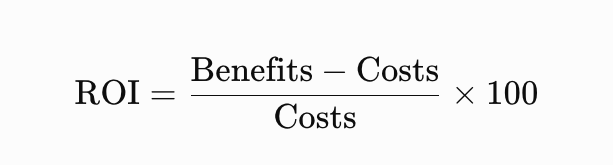
For example, benefits may include reduced overtime, lower administrative costs, and additional contribution from appointments accommodated using genuinely available capacity. Avoid counting theoretical time savings as revenue unless they translate into measurable financial outcomes.
Frequently Asked Questions About EHR Efficiency and Customer Medical Support
What Can Customer Medical Support Do for a Dermatology Practice?
Customer medical support can assist with appointment scheduling, patient registration, chart preparation, medical record organization, portal message routing, and administrative follow-up tracking. The exact scope depends on staff training, authorization, applicable regulations, and practice policies.
How Can Medical Support Staff Improve EHR Efficiency?
Medical support staff can reduce repetitive data entry, organize records before appointments, identify incomplete administrative information, and coordinate follow-up tasks. Standardized workflows help prevent avoidable delays and allow clinicians to spend more time on patient care.
Can a Remote Medical Support Specialist Work With Dermatology EHR Software?
Yes. A remote medical support specialist can work with compatible EHR or practice management systems when the practice authorizes access and provides appropriate training. Successful implementation requires clear SOPs, secure access, defined responsibilities, and reliable communication with in-house staff.
What Is the Difference Between an EHR and Practice Management Software?
An electronic health record (EHR) primarily supports clinical information management, including medical histories, encounter documentation, and treatment records. Practice management software focuses more on administrative operations such as scheduling, registration, billing, and appointment coordination.
Some platforms combine both capabilities. Practices should evaluate the functions available in their specific system rather than assume that every product offers the same features.
Can Zenoti, Aesthetic Record, and PatientNow Support Dermatology Workflows?
Zenoti, Aesthetic Record, and PatientNow offer software designed for medical aesthetics, wellness, or related practice operations. Their suitability depends on the clinic's services, documentation needs, and required integrations.
Before choosing a platform, dermatology practices should verify its clinical functionality, interoperability, privacy safeguards, and compatibility with existing systems.
How Can Customer Medical Support Reduce EHR Documentation Errors?
Support staff can follow standardized checklists, verify administrative information, organize incoming records, and flag missing fields for review. These measures can reduce certain preventable administrative errors.
Clinical documentation still requires appropriate provider oversight, and support personnel should never guess at missing clinical information or alter clinical findings without authorization.
Is It HIPAA-Compliant to Outsource EHR Administrative Tasks?
Outsourcing can be compatible with HIPAA when the arrangement meets applicable requirements. Depending on the relationship, the support provider may qualify as a business associate, requiring an appropriate business associate agreement.
Practices must also evaluate safeguards, access controls, workforce training, incident reporting, and subcontractor arrangements. A contract alone does not establish compliance.
What EHR Tasks Should Only Be Performed by Licensed Healthcare Professionals?
Tasks requiring professional clinical judgment generally belong to appropriately qualified healthcare professionals. These include diagnosing conditions, interpreting pathology results, determining treatment plans, and making clinical decisions about prescriptions.
Certain documentation and order-entry activities may be delegated under applicable laws and policies, but authorization, supervision, and provider authentication requirements must be respected.
How Much Does Customer Medical Support Cost for a Dermatology Practice?
Costs vary based on the provider, staff experience, coverage hours, task complexity, training requirements, and service arrangement. Some providers charge hourly rates, while others offer monthly packages or dedicated support arrangements.
When comparing proposals, consider the total cost, expected workload, security requirements, service coverage, and measurable operational benefits rather than choosing solely by price.
How Do You Measure the ROI of EHR Support Services?
Start by recording baseline administrative hours, documentation delays, scheduling errors, and relevant operating costs. After implementation, compare those figures with the new results and account for service fees, onboarding, training, and software expenses.
A useful assessment considers both financial outcomes and operational improvements, such as reduced after-hours documentation and more reliable follow-up coordination.
Can Customer Medical Support Help Reduce Missed Appointments?
Yes. Support teams can help send appointment reminders, confirm bookings, manage cancellation requests, and contact waitlisted patients according to practice procedures.
These measures may reduce avoidable missed appointments, although results depend on patient behavior, reminder preferences, scheduling policies, and the clinic's implementation.
How Should a Dermatology Practice Choose an EHR Support Provider?
Evaluate healthcare experience, dermatology workflow knowledge, EHR familiarity, security controls, communication skills, service coverage, and escalation procedures. Request a clear scope of work and define performance metrics before implementation.
A limited pilot can help determine whether the provider meets your clinic's accuracy, responsiveness, privacy, and productivity expectations.
How Can V-Assist Help With EHR Efficiency and Customer Medical Support?
Dermatology and medical aesthetics practices need reliable administrative processes to manage patient information, coordinate appointments, and keep daily operations organized. When these responsibilities compete with clinical work, dedicated remote support can help reduce the pressure on in-house teams.
V-Assist can be positioned as a virtual support partner for healthcare and medical aesthetics businesses seeking to streamline administrative workflows. Depending on the services agreed upon, support may include appointment coordination, patient communication, administrative data management, and follow-up task organization.
For practices considering a virtual assistant for medical spa operations or a medical spa virtual receptionist, the priority should be finding a support arrangement that fits the clinic's workflow, staffing needs, and privacy requirements.
Before implementing EHR-related support, dermatology practices should define the tasks to be delegated, confirm software compatibility, establish secure access procedures, and document the responsibilities that remain with licensed professionals.
With the right processes and appropriate oversight, customer medical support can help practices spend less time managing routine administrative work and more time delivering a consistent patient experience.